Latest Updates: ECU ISOBUS
17 Apr 2025
All latest updates have been applied to enhance user experience, improve safety during tests, and ensure better control over the system's calibration and operation.
New Development
We have added a powerful new development to enhance performance and usability. Here’s what’s new in this update.
Support Solid Fertilizer Applicator with up to Three Rates Control
We’ve added support for implements with up to three input rate controllers. The ISOBUS ECU can now be used in applications such as solid fertilizer spreaders with independently controlled conveyor belts.
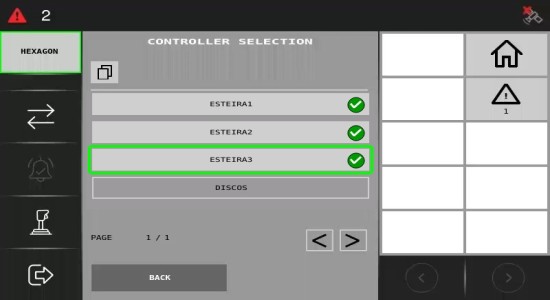
Machine operators will benefit from simplified calibration, as they can now choose to calibrate either a single conveyor belt or all of them at once, saving time. Additionally, operators working with a single product and multiple rate controls can set a single reference, streamlining the process. For those using prescription maps, each rate control will now follow the corresponding prescription for the area being applied, ensuring precise and accurate application.
Improvements
Here, we outline the various optimizations and refinements made to existing features. These changes are designed to improve performance, usability, and overall user satisfaction.
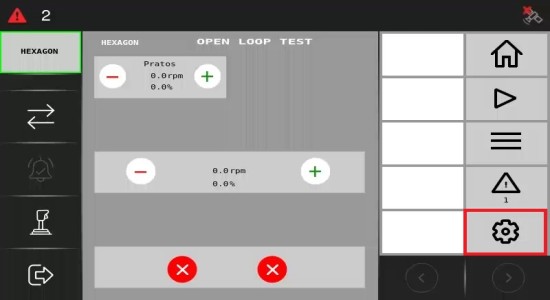
Add soft key to open controllers gains view to test views
Now, it's possible to directly access the gain adjustment screen can be accessed directly from the test screen without having to navigate between separate menus. This improvement streamlines the adjustment process, allowing the operator to perform tasks more quickly and efficiently, without the need to switch between different screens.
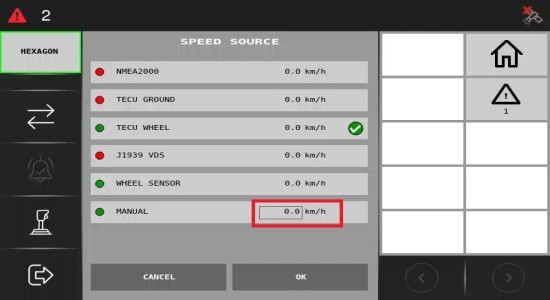
No visual indication for editable speed source parameters
The visual indication for editing the Speed Source parameters has been enhanced. Previously, users could modify the parameter values by clicking on the parameter number, but there was no clear indication that this was possible. This improvement now provides a distinct visual cue, making it easier for users to identify and adjust the Speed Source parameter values seamlessly.
Bug fix
This section addresses the issues identified in previous versions and details the fixes implemented. These corrections enhance system stability and ensure a smoother, more reliable operation.
Alarm text overflow issue
After installing version 1.4.0, when an alarm was triggered and the text exceeded one line, it was cut off. Now, the text size is adjusted to fit entirely within two lines.